
Gamma
AI platform that generates polished presentations, documents, and webpages from prompts or uploaded files — no slide design needed.
Updated 2026-04-30
Yes, within limits. Gamma runs a free tier with paid plans above it.
Listed pricing: Free tier, Plus $10/mo, Pro $20/mo (billed annually).
Overview
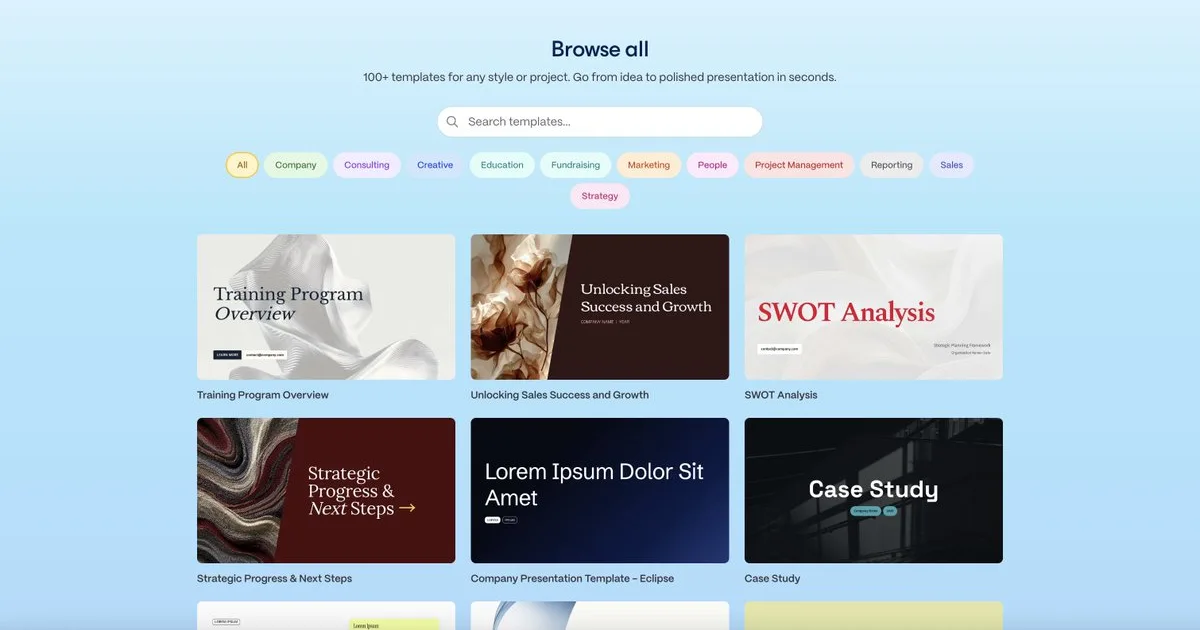
Gamma takes a text prompt, an outline, or an uploaded document and turns it into a complete, styled presentation in under a minute. It doesn't just slap text onto bullet-point slides — it generates a card-based layout with images, icons, and visual hierarchy that looks like someone actually designed it. You can also output your content as a scrollable document or a standalone webpage, which makes it more flexible than traditional slide tools.
The core audience is anyone who spends too long in PowerPoint or Google Slides: startup founders pitching investors, marketers building campaign decks, educators preparing lecture materials, and consultants assembling client deliverables. Gamma handles the design decisions so you can focus on the content. The AI suggests layouts, pulls in relevant imagery, and restructures your ideas into a visual flow.
What makes Gamma genuinely different from competitors like Beautiful.ai or Canva's AI presentation features is the nested card structure — each "slide" can expand into sub-sections, embed live content, and link to other cards, making it more like a micro-website than a traditional deck. The tradeoff is less granular control over exact positioning; if you're a designer who wants pixel-perfect layouts, you'll find the guardrails frustrating. But for speed-to-quality ratio, Gamma is hard to beat in the AI presentation space.
Is Gamma free?
Yes, within limits. Gamma runs a free tier with paid plans above it.
What the free tier covers: Generous free tier with 400 AI credits — enough to create several full presentations before needing to upgrade.
Listed pricing: Free tier, Plus $10/mo, Pro $20/mo (billed annually).
Pricing on this page has not been re-verified. The entry was last edited on , and no separate pricing check has been run since. Treat the figures as a record of what was published then and confirm on the official site.
What the free tier leaves out
Read straight off the plan list below. Vendors move features between tiers, so check the current split before you pay.
- Plus $10/mo (annual) Unlimited AI generation, remove Gamma branding, PDF/PPT export, custom domains, priority support
- Pro $20/mo (annual) Everything in Plus, advanced analytics, custom fonts, password-protected pages, team workspaces
Gamma pricing
| Plan | Price | What's included |
|---|---|---|
| Free | $0/mo | 400 AI credits, basic analytics, Gamma branding on exports, limited export options |
| Plus | $10/mo (annual) | Unlimited AI generation, remove Gamma branding, PDF/PPT export, custom domains, priority support |
| Pro | $20/mo (annual) | Everything in Plus, advanced analytics, custom fonts, password-protected pages, team workspaces |
400 AI credits, basic analytics, Gamma branding on exports, limited export options
Unlimited AI generation, remove Gamma branding, PDF/PPT export, custom domains, priority support
Everything in Plus, advanced analytics, custom fonts, password-protected pages, team workspaces
Pricing on this page has not been re-verified. The entry was last edited on , and no separate pricing check has been run since. Treat the figures as a record of what was published then and confirm on the official site.
Is Gamma worth it?
Worth it for Founders, marketers, educators, and consultants who need a polished presentation, document, or webpage produced from a prompt or outline.
You can test that on the free tier before paying anything. The recorded trade-offs are listed below, and any one of them can settle the question on its own.
The 8.5/10 AI Score is an editorial read of published capability, price and shipping pace. Nobody here has hands-on hours with Gamma. How we verify.
Worth it if
The strengths recorded against this entry.
- Goes from prompt to polished deck in under a minute — dramatically faster than manual slide creation
- Three output formats (presentation, document, webpage) from the same content
- Nested card structure supports richer, more interactive content than traditional slides
- Free tier is generous enough to evaluate the tool on real projects
Not worth it if
Any one of these blocks your use case.
- Limited fine-grained control over element positioning — designers wanting pixel-perfect layouts will feel constrained
- AI-generated imagery can feel generic; you'll often want to swap in your own visuals
- Export to PowerPoint loses some of Gamma's interactive features and nested structure
- Custom branding and analytics require paid plans
What sets Gamma apart
- Outputs the same content as a presentation, document, or webpage
- Nested card structure lets slides expand into sub-sections like a micro-website
- Imports and redesigns existing PowerPoint, PDF, or Slides files
- Built-in analytics on viewer engagement per card
Key features
AI Presentation Generator
Describe what you want or paste an outline, and Gamma produces a complete multi-slide presentation with layouts, images, and formatting. It restructures your content into a logical narrative flow rather than dumping text onto slides.
Document & Webpage Modes
Beyond presentations, Gamma can output the same content as a scrollable long-form document or a shareable webpage with its own URL — useful for memos, proposals, and internal knowledge bases.
Import & Redesign
Upload an existing PowerPoint, PDF, or Google Slides file and Gamma will redesign it using its AI layout engine. Useful for refreshing old decks without starting from scratch.
Built-in Analytics
Track who viewed your shared presentation, how long they spent on each card, and which sections got the most engagement — helpful for sales decks and investor pitches.
How it compares
| Tool | Best for | Pricing | Score |
|---|---|---|---|
| Gamma | Founders, marketers, educators, and consultants who need a polished presentation, document, or webpage produced from a prompt or outline. | Free tier, Plus $10/mo, Pro $20/mo (billed annually) | 8.5/10 |
| Grok Bot vs Grok Bot → | Anyone who wants an always-on teammate that signs into real apps, finishes work end to end, and only pings you for approval. | Included on eligible Cursor ($20+/mo), SuperGrok ($30+/mo), and Cursor Teams ($40+/seat/mo) plans. Product page also lists a Get started for free path. | 9.6/10 |
| Notion AI vs Notion AI → | Notion users who want an assistant that already knows their pages, databases, and documents for summaries and answers. | From $10/mo | 9/10 |
| Zapier vs Zapier → | Teams that need to connect many SaaS apps and build automations from a plain-English description instead of manual setup. | Free tier + Professional from $19.99/mo + Team from $69/mo + Enterprise contact | 8.9/10 |


Compare head-to-head
Related reading

Anthropic Traced More Than 23 Million Exchanges
Anthropic attributed more than 23 million exchanges to Moonshot between May and July in its September 2026 threat intelligence report.

23 Million Exchanges in Anthropic Misuse Report
Anthropic published its September 2026 threat intelligence report covering misuse cases disrupted between December 2025 and August 2026.

DeepSeek Flash KV Cache at 890 Bytes per Token
DeepSeek V4.1-Flash posts 90.6 on Terminal-Bench 2.1 against GPT-5.6 Sol at 88.8 while cutting KV cache to 890 bytes per token.
Ready to try Gamma?
Head to the official site to start with Gamma — pricing and plans are listed above.
Visit Gamma