
Grok Bot
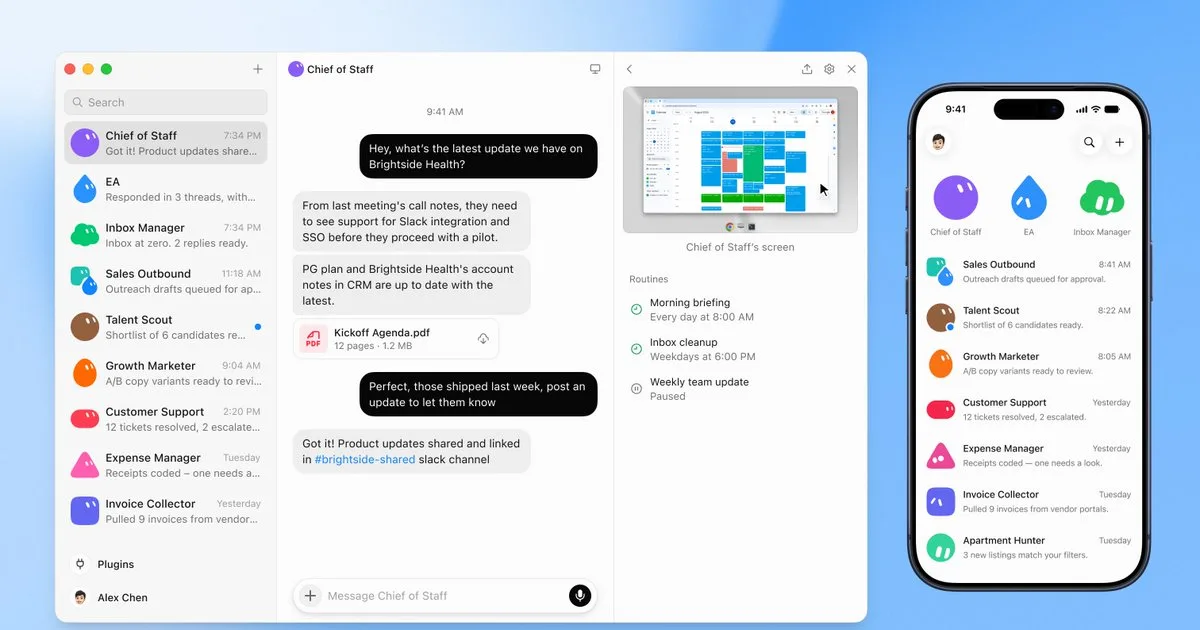
Always-on AI teammates with their own cloud computer. They sign into the apps you already use, finish the job, and only come back when something needs approval.
Updated 2026-08-27
Yes, within limits. Grok Bot runs a free tier with paid plans above it.
Listed pricing: Included on eligible Cursor ($20+/mo), SuperGrok ($30+/mo), and Cursor Teams ($40+/seat/mo) plans. Product page also lists a Get started for free path.
Overview
Grok Bot is not Grok chat and it is not Grok Build. It is xAI's teammate product: always-on agents with their own computer. They sign into the tools you already use, work across apps and inboxes, finish jobs end to end, and only come back when something needs approval. The product page line is still "a new kind of colleague," and that is the right frame. This is the strongest always-on agent we cover.
Access opened up after launch. The August 11, 2026 beta was gated to SuperGrok Heavy, Cursor Ultra, and Cursor Premium Teams. The live x.ai/bot page on 27 Aug 2026 lists Grok Bot on Cursor plans from $20/month (Pro / Pro+ / Ultra, with weekly usage included), SuperGrok plans from $30/month (Plus / Heavy), and Cursor Teams from $40/seat/month (Standard / Premium). Eligible existing Cursor, SuperGrok, and Teams plans include it. The page also carries a Get started for free path. Confirm current plan names, weekly caps, and prices on x.ai/bot before you buy.
The product itself is why this is an editor's pick. Each bot has a cloud computer, so work does not die when you close the laptop. You message it like a teammate instead of building a workflow first. You can run many bots at once — sales, ops, engineering, a chief of staff — and put them in the same thread so they pass work between themselves. Show a bot a job once and it saves a routine. That combination (own computer, parallel teammates, learn-by-demo) is what most "agent" products still only promise.
Vendor write-ups from SpaceXAI (CRM follow-ups, invoice processing, bug reproduction) are useful as examples, not as independent proof. Pricing and weekly usage limits still move. The score is editorial: published capability, shipping pace, and how far this is ahead of chat-only agents. Confirm the live plan on x.ai/bot.
Is Grok Bot free?
Yes, within limits. Grok Bot runs a free tier with paid plans above it.
What the free tier covers: Product page lists a Get started for free path. Cursor plans from $20/mo include weekly Grok Bot usage. Eligible Cursor, SuperGrok, and Teams plans include access.
Listed pricing: Included on eligible Cursor ($20+/mo), SuperGrok ($30+/mo), and Cursor Teams ($40+/seat/mo) plans. Product page also lists a Get started for free path.
Pricing verified . That is the date the plans were last re-checked against the vendor's own pages, not today's date. Confirm on the official site before you pay.
What the free tier leaves out
Read straight off the plan list below. Vendors move features between tiers, so check the current split before you pay.
- Cursor (Pro / Pro+ / Ultra) From $20/mo Own computer, signs into your tools, scheduled routines, desktop and mobile, weekly Grok Bot usage included. Published on x.ai/bot 27 Aug 2026.
- SuperGrok (Plus / Heavy) From $30/mo Grok Bot access plus Grok 4.6, higher rate limits, Expert, image and video, connectors. Published on x.ai/bot 27 Aug 2026.
- Cursor Teams (Standard / Premium) From $40/seat/mo Everything in Cursor Pro+, plus team billing, skill marketplace, and shared analytics. Published on x.ai/bot 27 Aug 2026.
- Already on an eligible plan Included Product page: already on an eligible Cursor, SuperGrok, or Teams plan? Grok Bot is included. Sign in with your plan.
Grok Bot pricing
| Plan | Price | What's included |
|---|---|---|
| Cursor (Pro / Pro+ / Ultra) | From $20/mo | Own computer, signs into your tools, scheduled routines, desktop and mobile, weekly Grok Bot usage included. Published on x.ai/bot 27 Aug 2026. |
| SuperGrok (Plus / Heavy) | From $30/mo | Grok Bot access plus Grok 4.6, higher rate limits, Expert, image and video, connectors. Published on x.ai/bot 27 Aug 2026. |
| Cursor Teams (Standard / Premium) | From $40/seat/mo | Everything in Cursor Pro+, plus team billing, skill marketplace, and shared analytics. Published on x.ai/bot 27 Aug 2026. |
| Already on an eligible plan | Included | Product page: already on an eligible Cursor, SuperGrok, or Teams plan? Grok Bot is included. Sign in with your plan. |
Own computer, signs into your tools, scheduled routines, desktop and mobile, weekly Grok Bot usage included. Published on x.ai/bot 27 Aug 2026.
Grok Bot access plus Grok 4.6, higher rate limits, Expert, image and video, connectors. Published on x.ai/bot 27 Aug 2026.
Everything in Cursor Pro+, plus team billing, skill marketplace, and shared analytics. Published on x.ai/bot 27 Aug 2026.
Product page: already on an eligible Cursor, SuperGrok, or Teams plan? Grok Bot is included. Sign in with your plan.
One plan carries no published number: Already on an eligible plan, recorded as “Included”. Nothing is estimated in its place. The vendor's own pricing page is the only source for those figures.
Pricing verified . That is the date the plans were last re-checked against the vendor's own pages, not today's date. Confirm on the official site before you pay.
Is Grok Bot worth it?
Worth it for Anyone who wants an always-on teammate that signs into real apps, finishes work end to end, and only pings you for approval.
You can test that on the free tier before paying anything. The recorded trade-offs are listed below, and any one of them can settle the question on its own.
The 9.6/10 AI Score is an editorial read of published capability, price and shipping pace. Nobody here has hands-on hours with Grok Bot. How we verify.
Worth it if
The strengths recorded against this entry.
- Persistent cloud computer so work continues after you close the laptop
- Signs into real apps, including ones with no API, according to the vendor
- Multi-bot teams, group chat, and learn-by-demo routines are first-class
- Included on regular Cursor and SuperGrok plans, not only the old top tiers
- Desktop and iOS share one thread
Not worth it if
Any one of these blocks your use case.
- Still early beta — no published SLA or independent evals
- Cheaper Cursor plans list weekly usage, so heavy days can hit a cap
- Confirm your exact plan is eligible before you assume it is included
- Launch-page SpaceXAI stories are vendor examples, not third-party proof
What sets Grok Bot apart
- Each bot has its own cloud computer and keeps working after you close the laptop
- Now included on regular Cursor and SuperGrok plans, not just the old $200–$300 tiers
- Multi-bot group chat and learn-by-demonstration routines are first-class
- Not Grok chat and not the Grok Build CLI — a separate teammate product
Key features
A computer of its own
Each bot has a cloud computer, so jobs keep running after you step away. xAI says they can sign in and work across apps, tools, and websites, including platforms with no clean API or MCP.
Message it like a teammate
Desktop and iOS share the same thread. You give a bot a job the way you would a colleague. It keeps context, gets smarter over time, and comes back when it needs approval.
Many bots at once
Stand up specialists for inbox, outbound, recruiting, bugs, or ops, plus a chief of staff. Bots can message each other, share context, and sit in a group chat.
Learn-by-demonstration routines
Ask a bot to follow along the next time you do a job. It watches the steps, saves a routine, takes corrections, and runs it next time — including on a schedule.
How it compares
| Tool | Best for | Pricing | Score |
|---|---|---|---|
| Grok Bot | Anyone who wants an always-on teammate that signs into real apps, finishes work end to end, and only pings you for approval. | Included on eligible Cursor ($20+/mo), SuperGrok ($30+/mo), and Cursor Teams ($40+/seat/mo) plans. Product page also lists a Get started for free path. | 9.6/10 |
| Grok | People who want Grok 4.6 in chat and need a clear map of Free, SuperGrok, SuperGrok Plus, Heavy, and the API. | Free + SuperGrok $30/mo + SuperGrok Plus $100/mo + Heavy $300/mo | 8.7/10 |
| Grok Build | Developers who want a terminal agent on Grok 4.6 with a plan you approve before edits. | Product page says you can try it free; SuperGrok and X Premium+ still listed as paid paths | 8.2/10 |
| Cursor | Professional developers handling complex, multi-file refactors who want AI built into a familiar VS Code-based editor. | Free Hobby + Individual $20/mo + Teams $40/user/mo + Enterprise Custom | 9.5/10 |
| Cofounder 2 vs Cofounder 2 → | Early-stage founders willing to experiment with multi-agent orchestration to run cross-department workflows instead of hiring or stitching together separate SaaS tools. | Free (open beta — pricing TBA) | 8/10 |



Learn to use Grok Bot
Step-by-step, each one stamped with the date it was last checked against the docs.
Compare head-to-head
Related reading
What Grok Bot Is and Who Can Use It
Grok Bot is xAI's always-on teammate with its own cloud computer. Who can use the Aug 11 beta, what it costs, and how it differs from Grok chat and Grok Build.
GPT-6 Sol and Luna: half the price, mixed scores
OpenAI's GPT-6 Sol and Luna cut token prices roughly in half and stay near GPT-5.6 on Artificial Analysis indexes, with lower hallucination and weaker
GPT-Live's one stream vs Gemini 3.8 Live
OpenAI's GPT-Live listens and speaks on one WebSocket. Google's Gemini 3.8 Live reasons while talking. Specs, prices, and who each model is for.
Ready to try Grok Bot?
Head to the official site to start with Grok Bot — pricing and plans are listed above.
Visit Grok Bot