
WorkBeaver
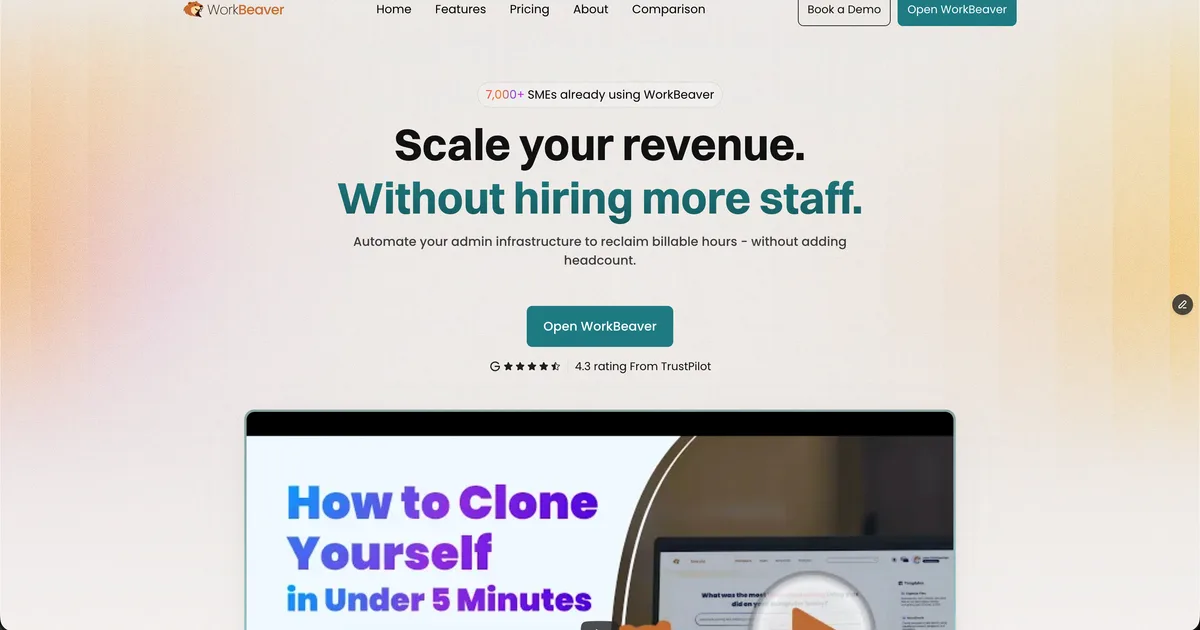
AI digital intern that learns your repetitive tasks by watching you work, then runs them autonomously across any desktop or browser app.
Updated 2026-04-30
Yes, within limits. WorkBeaver runs a free tier with paid plans above it.
Listed pricing: Free (25 tasks one-time) + Priority $23.95/mo + Founder $108/mo.
Overview
WorkBeaver takes a fundamentally different approach to automation than tools like Zapier or n8n. Instead of connecting apps through APIs and pre-built integrations, it watches your screen as you perform a task, learns the sequence of clicks, keystrokes, and decisions involved, and then replays that workflow autonomously. You can also describe tasks in plain English and let WorkBeaver figure out the steps itself.
The target audience is small and medium businesses — the kind that have admin staff doing the same data entry, file moves, or CRM updates dozens of times a day. WorkBeaver positions itself as an AI intern that handles those repetitive tasks so humans can focus on higher-value work. It has picked up real traction among 7,000+ SMEs who appreciate that it works with whatever apps they already use, not just the ones with API support.
What makes it genuinely interesting is the app-agnostic approach. Most automation tools only work with their integration catalog. WorkBeaver operates at the UI level, so it can automate legacy desktop software, internal tools, or niche web apps that will never show up in Zapier's directory. The trade-off is that UI-based automation is inherently more fragile — a redesigned interface or unexpected popup can break a learned task.
Is WorkBeaver free?
Yes, within limits. WorkBeaver runs a free tier with paid plans above it.
What the free tier covers: 25 simple tasks as a one-time grant to try the platform — not a recurring allowance.
Listed pricing: Free (25 tasks one-time) + Priority $23.95/mo + Founder $108/mo.
Pricing on this page has not been re-verified. The entry was last edited on , and no separate pricing check has been run since. Treat the figures as a record of what was published then and confirm on the official site.
What the free tier leaves out
Read straight off the plan list below. Vendors move features between tiers, so check the current split before you pay.
- Priority $23.95/mo 500 tasks/mo, priority execution, all app types
- Founder $108/mo High-volume tasks, advanced workflows, priority support
WorkBeaver pricing
| Plan | Price | What's included |
|---|---|---|
| Free | Free | 25 simple tasks (one-time token grant) |
| Priority | $23.95/mo | 500 tasks/mo, priority execution, all app types |
| Founder | $108/mo | High-volume tasks, advanced workflows, priority support |
25 simple tasks (one-time token grant)
500 tasks/mo, priority execution, all app types
High-volume tasks, advanced workflows, priority support
Pricing on this page has not been re-verified. The entry was last edited on , and no separate pricing check has been run since. Treat the figures as a record of what was published then and confirm on the official site.
Is WorkBeaver worth it?
Worth it for Small and medium business admin staff who repeat the same data entry, file moves, or CRM updates across apps that lack API integrations.
You can test that on the free tier before paying anything. The recorded trade-offs are listed below, and any one of them can settle the question on its own.
The 8.5/10 AI Score is an editorial read of published capability, price and shipping pace. Nobody here has hands-on hours with WorkBeaver. How we verify.
Worth it if
The strengths recorded against this entry.
- Works with any app — no integration catalog limits
- Learn-by-demonstration means zero technical setup
- Genuinely useful for automating tasks in legacy or niche software
- Affordable entry price at $23.95/mo for 500 tasks
Not worth it if
Any one of these blocks your use case.
- UI-based automation is more fragile than API-based alternatives
- Free tier is a one-time 25-task grant, not a recurring allowance
- Relatively new — smaller community and fewer resources than established tools
- Complex multi-step tasks across several apps can require manual tuning
What sets WorkBeaver apart
- Learns tasks by watching screen demonstrations, no technical setup required
- Automates any desktop or browser app instead of only apps in an integration catalog
- Accepts plain-English task descriptions as an alternative to demonstration
- Runs learned tasks in the background without interrupting other work
Key features
Learn by Demonstration
Record yourself performing a task and WorkBeaver learns the sequence of actions — clicks, keystrokes, copy-paste operations, and navigation steps — then replicates them independently.
Natural Language Tasks
Describe what you need done in plain English instead of demonstrating it. WorkBeaver interprets the instruction and figures out how to execute it across your apps.
Desktop & Browser
Works across any application on your computer — desktop software, browser-based tools, internal systems — without needing pre-built integrations or API access.
Background Execution
Tasks run reliably in the background without interrupting your work. Queue up multiple tasks and let them process while you focus on other things.
How it compares
| Tool | Best for | Pricing | Score |
|---|---|---|---|
| WorkBeaver | Small and medium business admin staff who repeat the same data entry, file moves, or CRM updates across apps that lack API integrations. | Free (25 tasks one-time) + Priority $23.95/mo + Founder $108/mo | 8.5/10 |
| Grok Bot vs Grok Bot → | Anyone who wants an always-on teammate that signs into real apps, finishes work end to end, and only pings you for approval. | Included on eligible Cursor ($20+/mo), SuperGrok ($30+/mo), and Cursor Teams ($40+/seat/mo) plans. Product page also lists a Get started for free path. | 9.6/10 |
| Notion AI vs Notion AI → | Notion users who want an assistant that already knows their pages, databases, and documents for summaries and answers. | From $10/mo | 9/10 |
| Zapier vs Zapier → | Teams that need to connect many SaaS apps and build automations from a plain-English description instead of manual setup. | Free tier + Professional from $19.99/mo + Team from $69/mo + Enterprise contact | 8.9/10 |


Compare head-to-head
Related reading

Anthropic Traced More Than 23 Million Exchanges
Anthropic attributed more than 23 million exchanges to Moonshot between May and July in its September 2026 threat intelligence report.

23 Million Exchanges in Anthropic Misuse Report
Anthropic published its September 2026 threat intelligence report covering misuse cases disrupted between December 2025 and August 2026.

DeepSeek Flash KV Cache at 890 Bytes per Token
DeepSeek V4.1-Flash posts 90.6 on Terminal-Bench 2.1 against GPT-5.6 Sol at 88.8 while cutting KV cache to 890 bytes per token.
Ready to try WorkBeaver?
Head to the official site to start with WorkBeaver — pricing and plans are listed above.
Visit WorkBeaver