Parrot
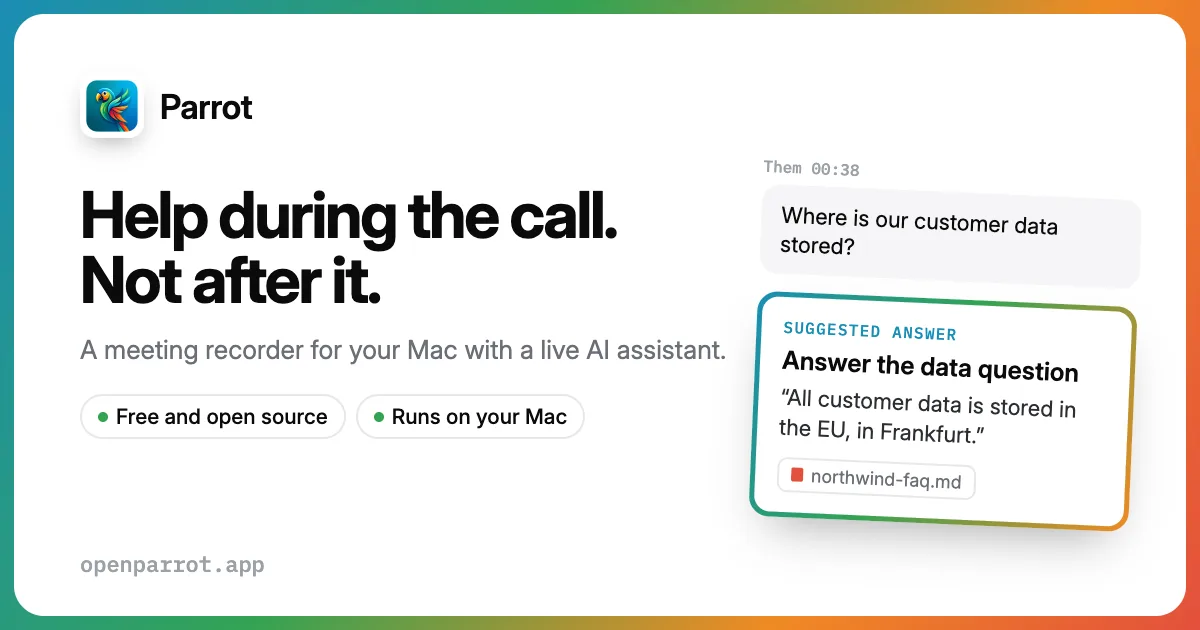
Open-source Mac meeting assistant: on-device transcripts, live answers from your docs, and post-call reports.
Updated 2026-10-18
Yes, within limits. Parrot runs a free tier with paid plans above it.
Listed pricing: Free (GPL-3.0); optional paid cloud transcription or your own API keys.
Overview
Parrot is a free, open-source meeting recorder and live assistant for Mac. It transcribes on the device, suggests answers from your documents while the call is still going, and generates a report after the call ends.
It is aimed at people who take meetings on a Mac and do not want a third-party bot in the room. The October 16, 2026 v0.29.7 release, which drew Product Hunt and Hacker News attention, centers on that local-first design: transcription can stay on-device, with optional paid cloud transcription or your own API keys if you want a hosted model instead.
Against Otter, Fireflies, Fathom, and Granola, the checkable differences are the GPL-3.0 license, capture without a meeting bot, and mid-call suggestions drawn from your files. It is a single-platform app, not a team meeting suite, so anyone who needs Windows, a shared workspace, or deep CRM sync should start with those incumbents.
Is Parrot free?
Yes, within limits. Parrot runs a free tier with paid plans above it.
What the free tier covers: The Mac app is free under GPL-3.0, including on-device transcription. Paid cloud transcription and third-party API usage are optional.
Listed pricing: Free (GPL-3.0); optional paid cloud transcription or your own API keys.
Pricing on this page has not been re-verified. The entry was last edited on , and no separate pricing check has been run since. Treat the figures as a record of what was published then and confirm on the official site.
What the free tier leaves out
Read straight off the plan list below. Vendors move features between tiers, so check the current split before you pay.
- Cloud transcription or API keys Check website for current pricing Optional paid cloud transcription, or use your own API keys; the app itself stays free and open source
Parrot pricing
| Plan | Price | What's included |
|---|---|---|
| Open-source app | Free | GPL-3.0 Mac app with on-device transcription, live suggestions from your documents, and post-call reports |
| Cloud transcription or API keys | Check website for current pricing | Optional paid cloud transcription, or use your own API keys; the app itself stays free and open source |
GPL-3.0 Mac app with on-device transcription, live suggestions from your documents, and post-call reports
Optional paid cloud transcription, or use your own API keys; the app itself stays free and open source
One plan carries no published number: Cloud transcription or API keys, recorded as “Check website for current pricing”. Nothing is estimated in its place. The vendor's own pricing page is the only source for those figures.
Pricing on this page has not been re-verified. The entry was last edited on , and no separate pricing check has been run since. Treat the figures as a record of what was published then and confirm on the official site.
Is Parrot worth it?
You can test that on the free tier before paying anything. The recorded trade-offs are listed below, and any one of them can settle the question on its own.
The 8.2/10 AI Score is an editorial read of published capability, price and shipping pace. Nobody here has hands-on hours with Parrot. How we verify.
Worth it if
The strengths recorded against this entry.
- Transcribes on the Mac by default, so the local path does not require uploading audio to a notetaker cloud
- Captures the meeting without a bot joining the call, unlike Fireflies or Otter's meeting bots
- Suggests answers from your own documents while the call is still in progress
- GPL-3.0 source, with cloud transcription or API keys only if you opt out of purely local transcription
Not worth it if
Any one of these blocks your use case.
- Mac only, so Windows and browser-only teams are outside its scope
- On-device transcript quality and speed depend on the Mac and the local model; hosted transcription is the paid or bring-your-own-key alternative
- Public materials emphasize local capture and reports more than the calendar, CRM, and shared-workspace integrations Otter and Fireflies sell
- Optional cloud transcription is priced separately from the free app, so a fully hosted setup is not free by default
Key features
On-device transcription
Audio can be transcribed locally on the Mac so the default path does not send the meeting to a cloud transcription vendor. Cloud transcription or your own API keys remain optional when you want a hosted model.
Live doc answers
During the call, Parrot suggests answers drawn from your documents rather than waiting for a recap. That is meant for people who need to pull from notes or reference material while they are still on the line.
Post-call reports
After the meeting it generates a written report from the session. The public pitch treats that report as the handoff, not a live collaborative workspace.
No-bot capture
Parrot records from the Mac instead of joining the call as a visible meeting bot. That is the contrast with bot-based notetakers such as Fireflies and Otter.
How it compares
| Tool | Best for | Pricing | Score |
|---|---|---|---|
| Parrot | — | Free (GPL-3.0); optional paid cloud transcription or your own API keys | 8.2/10 |
| Grok Bot | Anyone who wants an always-on teammate that signs into real apps, finishes work end to end, and only pings you for approval. | Included on eligible Cursor ($20+/mo), SuperGrok ($30+/mo), and Cursor Teams ($40+/seat/mo) plans. Product page also lists a Get started for free path. | 9.6/10 |
| Notion AI | Notion users who want an assistant that already knows their pages, databases, and documents for summaries and answers. | From $10/mo | 9/10 |
| Zapier | Teams that need to connect many SaaS apps and build automations from a plain-English description instead of manual setup. | Free tier + Professional from $19.99/mo + Team from $69/mo + Enterprise contact | 8.9/10 |
Compare head-to-head
Comparison explorer Put Parrot up against any three tools Opens with Parrot already loaded. Add up to three more from the full index and read pricing, features, pros and cons in one table. →Related reading

DeepSeek Flash vs Claude Opus 5 at 35.4 and 28.6
DeepSeek's own tables put an open-weights Flash model at 35.4 and Claude Opus 5 at 28.6 on Agents' Last Exam.

DeepSeek V4.1-Flash-1017 Benchmarks and Access
DeepSeek open-sourced V4.1-Flash-1017, with public comparisons putting it at 60.5 on Automation-Bench.

OpenAI Caps Rosalind Lab Access at 30 Seats
Eligible U.S. university labs can take up to 30 free Business Standard seats for 12 months with sponsored GPT-Rosalind access.
Ready to try Parrot?
Head to the official site to start with Parrot — pricing and plans are listed above.
Visit Parrot