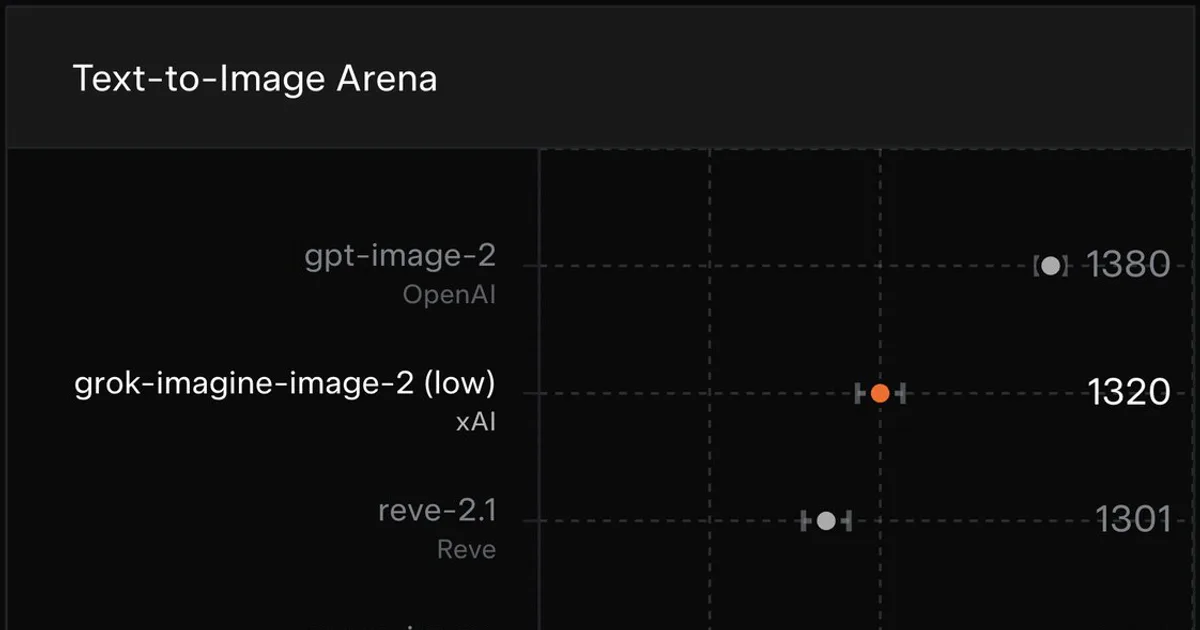

Imagine Image 2.0
xAI's image model behind Grok Imagine's Quality Mode — object-level edits, compositing, background removal and reframing, free with a Grok account.
Updated 2026-08-10
Yes, within limits. Imagine Image 2.0 runs a free tier with paid plans above it.
Listed pricing: Free with a Grok account; SuperGrok $30/mo, Heavy $300/mo; API ~$0.06/image.
Overview
Imagine Image 2.0 is xAI's image generation and editing model, announced on 7 August 2026 and now the engine behind Quality Mode in Grok Imagine at grok.com/imagine. The upgrade targets what happens after the first render rather than the render itself: object-level edits that leave the rest of the frame alone, compositing several source images into one output, reframing to a new aspect ratio by regenerating the extended area instead of cropping it, and cutting a subject out of its background — all inside the model that made the image.
It suits people whose current workflow spans three products: a generator, a background remover, and something for reframing. Social and marketing creatives iterating on a single visual, product teams assembling quick mockups, and anyone already inside the Grok apps who doesn't want a second subscription just to clean up an output. Distribution is the strongest part of the case — it ships in the Grok web app, the mobile apps and inside X, where a free account reaches it under rate limits xAI does not publish, and SuperGrok ($30/mo) or SuperGrok Heavy ($300/mo) raise them. Midjourney still has no free tier at all, and Adobe Firefly's deeper editing sits behind Creative Cloud.
The honest take: free access plus in-model editing gives it the best value-to-cost position in consumer image generation right now, and teams automating can reach the same capability through the API as grok-imagine-image-quality at roughly $0.06 per image — about 2.7× xAI's standard grok-imagine-image tier at ~$0.022. What's missing is verification. xAI has published no independent benchmark comparison against Google's Nano Banana-line editors or FLUX-class editing models, the free-tier limits are unpublished and tighten under load, and the model shipped in August 2026, so its public track record is vendor claims plus early user reaction. Judge it on access and workflow, not on a proven quality lead.
Is Imagine Image 2.0 free?
Yes, within limits. Imagine Image 2.0 runs a free tier with paid plans above it.
What the free tier covers: Yes — a free Grok account can generate and edit, subject to unpublished rate limits that tighten at peak times.
Listed pricing: Free with a Grok account; SuperGrok $30/mo, Heavy $300/mo; API ~$0.06/image.
Pricing verified . That is the date the plans were last re-checked against the vendor's own pages, not today's date. Confirm on the official site before you pay.
What the free tier leaves out
Read straight off the plan list below. Vendors move features between tiers, so check the current split before you pay.
- SuperGrok $30/mo Higher generation and editing limits, priority access to Quality Mode across the Grok apps
- SuperGrok Heavy $300/mo xAI's top consumer tier — highest limits and earliest access to new model releases
- API (grok-imagine-image-quality) ~$0.06 per image Programmatic per-request access ($0.01 input + $0.05 output); the standard grok-imagine-image tier runs ~$0.022. Same key covers Grok text and video models
Imagine Image 2.0 pricing
| Plan | Price | What's included |
|---|---|---|
| Free (Grok account) | $0 | Generation and editing in Grok Imagine on web, mobile and X, under rate limits xAI does not publish as a fixed number |
| SuperGrok | $30/mo | Higher generation and editing limits, priority access to Quality Mode across the Grok apps |
| SuperGrok Heavy | $300/mo | xAI's top consumer tier — highest limits and earliest access to new model releases |
| API (grok-imagine-image-quality) | ~$0.06 per image | Programmatic per-request access ($0.01 input + $0.05 output); the standard grok-imagine-image tier runs ~$0.022. Same key covers Grok text and video models |
Generation and editing in Grok Imagine on web, mobile and X, under rate limits xAI does not publish as a fixed number
Higher generation and editing limits, priority access to Quality Mode across the Grok apps
xAI's top consumer tier — highest limits and earliest access to new model releases
Programmatic per-request access ($0.01 input + $0.05 output); the standard grok-imagine-image tier runs ~$0.022. Same key covers Grok text and video models
Pricing verified . That is the date the plans were last re-checked against the vendor's own pages, not today's date. Confirm on the official site before you pay.
Is Imagine Image 2.0 worth it?
Worth it for Social and marketing creatives who need one visual in three aspect ratios with the background cut and one object fixed, without paying for a generator plus a background remover plus a reframing tool.
You can test that on the free tier before paying anything. The recorded trade-offs are listed below, and any one of them can settle the question on its own.
The 9/10 AI Score is an editorial read of published capability, price and shipping pace. Nobody here has hands-on hours with Imagine Image 2.0. How we verify.
Worth it if
The strengths recorded against this entry.
- Free access through any Grok account, where Midjourney has no free tier and Firefly's editing depth requires Creative Cloud
- Generation and editing live in one model — compositing, background removal and reframing don't require a second product
- Multi-image compositing is genuinely uncommon in consumer image apps; DALL-E 3 and Imagen don't expose it
- Reframing regenerates the extended area rather than cropping, which is the real need when one asset ships in three aspect ratios
- Plain-language prompting with no seed, weight or parameter syntax to learn, unlike Midjourney's flag-based interface
Not worth it if
Any one of these blocks your use case.
- Free-tier limits are not published as a concrete number and tighten under load, so throughput is unpredictable
- No independent benchmark comparison against Nano Banana-line or FLUX-class editors yet — cross-model quality claims rest on xAI's own numbers
- Editing is built for fast consumer iteration, not the layer-level, non-destructive control a designer gets in Photoshop or Firefly
- On the API the quality tier costs roughly 2.7× xAI's own standard image tier, which is a real decision at volume
What sets Imagine Image 2.0 apart
- Object-level editing, compositing, background removal and reframing in the same model that generated the image, reachable on a free account
- Multi-image compositing, which DALL-E 3, Imagen and Midjourney do not expose to consumer users
- Ships inside X and the Grok apps rather than as a standalone product, so there's no separate signup or subscription
- Same capability available two ways — free consumer app or metered API at ~$0.06/image — instead of subscription-only access
Key features
Object-level editing
Targeted edits to one element of an existing image instead of a full regeneration, so fixing a hand or a label doesn't reroll the whole composition. This is the difference between an editor and a slot machine.
Multi-image compositing
Merges several source images into one coherent output — putting a product into a scene, or combining reference material. Most consumer text-to-image models expose no equivalent at all.
Smart reframing
Changes aspect ratio by generating the extended area rather than cropping or stretching, which is what you actually need when one asset has to ship as a square post, a story and a banner.
In-model background removal
Cuts the subject from its background without leaving the generator, removing the usual reason to bounce out to a dedicated tool like Photoroom for e-commerce and social assets.
How it compares
| Tool | Best for | Pricing | Score |
|---|---|---|---|
| Imagine Image 2.0 | Social and marketing creatives who need one visual in three aspect ratios with the background cut and one object fixed, without paying for a generator plus a background remover plus a reframing tool. | Free with a Grok account; SuperGrok $30/mo, Heavy $300/mo; API ~$0.06/image | 9/10 |
| Midjourney vs Midjourney → | Concept artists, art directors and illustrators who want a striking, coherent house style out of the box and don't need to call the model from code. | From $10/mo (no free tier) | 8.8/10 |
| FLUX.2 vs FLUX.2 → | Engineering and creative-ops teams building image generation into a product or pipeline — especially anyone who needs to self-host, fine-tune on proprietary assets, or hold a product or character consistent across thousands of renders. | FLUX.2 [pro] from ~$0.03/image via API; open weights for [dev] and [klein] — check site for current rates | 8.8/10 |
| Reve Image vs Reve Image → | Designers and marketing teams producing posters, ad creative and UI mockups where a misspelled word inside the image or a misplaced element makes the asset unusable. | Free tier + Lite $7.99/mo, Pro $19.99/mo (June 2026 tiers — check site) | 8.5/10 |



Compare head-to-head
Related reading
Muse Glimmer and the 30B Open-Weights Ceiling
Meta released Muse Glimmer's 30B weights under Apache 2.0, landing in the same consumer-GPU size class as every other recent open model release.
OpenAI Astra's Cyber Pause and the Release Rules
OpenAI flagged Astra as critical on cybersecurity and paused non-essential work on it. What the hold covers and what nobody outside OpenAI can check.
ChatGPT Slider and Think Button: How to Use Both
OpenAI put reasoning depth under your control in ChatGPT. Which tier gets which control, which setting fits which task, and when to leave both alone.
Ready to try Imagine Image 2.0?
Head to the official site to start with Imagine Image 2.0 — pricing and plans are listed above.
Visit Imagine Image 2.0